
Finding Baytown Residents Through Records
To search the Baytown residents directory well, begin with the kind of fact you need to check. An address can lead to a parcel, a name can lead to a court index, and an old household can lead to a printed directory or newspaper citation. Each result has a date and a purpose. A deed identifies parties to a recorded instrument. An appraisal record describes taxable property. A voter result is a civic record with protected fields. Treat each as one part of a careful Baytown search, not as a full profile.
Baytown adds one essential first step. A mailing address can fall in Harris County or Chambers County, so the same city name does not select the right clerk, appraisal district, election office, or court. Use the address and city map first. Then keep the portal result, the date inspected, and the source type together. That makes it much easier to tell a current lead from a historical one.
- Confirm the address, ZIP, city or ETJ status, and county with USPS and the Baytown map tools.
- Check the applicable appraisal district for the parcel, situs address, legal description, and owner or mailing field.
- Use the correct county clerk index for recorded deeds, liens, releases, maps, and other instruments.
- For a civic or historical question, use the county election route or Sterling Municipal Library’s dated collections.
- Ask the custodian for an existing record when the online route ends, rather than asking an office to compile a new resident list.
Baytown Resident Records Office Routes
Baytown’s resident records are held by different offices because each office maintains a different type of record. The City Clerk handles municipal archives, notices, vital-statistics contacts, and Texas Public Information Act requests. Harris and Chambers county clerks maintain recorded instruments and other county records. Appraisal districts maintain parcel records. Use the Baytown street directory when the question starts with one address and needs the full address-keyed trail.
Harris County Clerk
201 Caroline Street, Suite 320
Houston, TX 77002
713-274-8680
Baytown City Clerk
2401 Market Street
Baytown, TX 77520
281-420-6697
Harris copies can be ordered online, at an annex, by mail, or through the Clerk’s contact route. Chambers offers the portal plus public computers at Anahuac and the West Annex in Mont Belvieu. Baytown’s written open-records route is for existing municipal records. It does not require the City to perform legal research or create a new report.
Baytown’s Two-County Records Map
Baytown’s geography is the first filter for any residents directory search. The city has Harris-side and Chambers-side addresses, with city limits, ETJ, ZIP, precinct, and county layers that do not always match. A Harris deed search cannot retrieve a Chambers deed. A postal city line cannot certify a parcel’s jurisdiction. Start with Baytown Specific Web Maps for jurisdiction, zones, utilities, schools, parks, and city-resource contacts, then move to the county system tied to the parcel.
The broader Baytown Interactive City Maps route accepts an address or County Parcel ID. Its layer set can show city limits, ETJ, annexations, council districts, ZIP geography, and voting precincts. Those layers answer where an address is administered. They do not certify title, occupancy, or a person’s present location.
Note: A Baytown mailing address is a useful starting point, but the county and parcel result determine which official record trail applies.
Baytown Property and Deed Search Fields
The property and deed routes are strongest when they are used together. The appraisal district supplies a parcel account, situs address, legal description, map position, tax context, and owner or mailing fields. The county clerk’s index supplies instrument parties and recording details. For Harris, the real-property form searches file number, date range, grantor, grantee, subdivision or description, instrument type, volume, page, lot, block, unit, abstract, tract, and other legal-description fields. Harris online images begin November 1, 1960.
| Baytown search route | Useful fields | What it establishes | Fallback |
|---|---|---|---|
| Harris County Clerk | Grantor, grantee, date, subdivision, file number | Recorded instrument trail | Counter, mail, contact route, older microfilm |
| Chambers Official Records | Grantor, grantee, document type, number, recorded date | Index or OCR record lead | Anahuac or West Annex public computers |
| HCAD | Account, owner name, address | Appraisal and parcel context | HCAD phone or public-data help |
| ChambersCAD | Owner, Geo ID, legal, number, street, ZIP, subdivision | Appraisal parcel and tax-year context | ChambersCAD office or map |
A CAD owner field can lag, and a mailing address may be elsewhere. A recorded deed can show ownership history without establishing who occupies a property. Save the legal description before comparing records across systems.
Baytown Voter Routes and Privacy
For a current civic question, Harris County provides a registration search with Current Registrations and Pending Registrations modes, a field selector, and search text. The separate Harris sample-ballot form accepts an election date plus last, first, middle, address, certificate number, or VUID. Chambers-side addresses must be handled through the Chambers County election route. Those are county-specific systems, even when both addresses use Baytown as their postal city.
| Harris sample-ballot field | Format or rule |
|---|---|
| Election Date | Required dropdown |
| Name | Last, first, and middle fields |
| Address | Optional search input |
| Certificate No. or VUID | Optional identifier input |
| Search / Clear | At least one search field is required |
Harris precinct data also offers all voters by ZIP or district in CSV form, but Texas Election Code restrictions apply. Protected voters and officials can have information suppressed. Voting history can be public, while ballot choices are not. A voter result is a dated civic signal, not a complete Baytown residents directory entry.
Current Baytown Residents Directory Sources
No one current roll covers every Baytown resident. The official sources below answer separate questions. Start with the source whose custodian holds the type of record you need, then compare it with a second independent source when an identity question matters. The Baytown resident lookup route focuses on this one-person confirmation process.
| Baytown source | What it can show | Custodian | Access boundary |
|---|---|---|---|
| HCAD or ChambersCAD | Parcel, situs, owner or mailing field, legal description | Applicable appraisal district | Appraisal data, not occupancy proof |
| County clerk index | Recorded deed and instrument parties | Harris or Chambers County Clerk | Index and copy paths differ |
| Voter search or product | Status, precinct, permitted registration fields | County election office | Suppression and Election Code rules apply |
| Baytown archive | Notices, permit reports, budgets, court archive categories | Baytown City Clerk | Searchable municipal archive, not a people index |
| Credential or entity records | Official license or filing context | Texas issuing agency | Does not prove residence |
- Roll
- A maintained list for one official purpose, such as appraisal or voter registration.
- Index
- A finding tool that points to a record, image, or request route.
- Parcel
- A mapped unit of property with an account or legal description.
- Criss-cross directory
- An address-arranged historical directory used to move from a house number to a dated name.
Baytown City Archive Search Tools
The Baytown City Archive is a useful handoff when the goal is a municipal document rather than a person listing. Its form has Keywords, Archive, Time Period, Date Range Start, Date Range End, and Search controls. It can lead to City Clerk notices, municipal-court archived documents, monthly permit reports, budgets, public notices, police annual reports, and property-tax-rate records.
Use the archive to identify a department, record title, or date range before making a written request. If the desired item is not indexed, Baytown’s Open Records route under the Texas Public Information Act can seek existing municipal records. Precise requests work best: name the department, document type, and date range, and request the form in which the office maintains it.
Baytown Court and Vital Record Paths
Courts, vital records, and municipal files each have their own custodian. Harris JP search accepts a case number, driver-license number, a name and date of birth, business name, or court selection. Harris District Clerk public case information is free after registered login, with party, role, filing date, status, court type, and case or offense type fields. Baytown Municipal Court is separate, and Chambers court records require the Chambers route. A no-result can reflect confidentiality, older case retention, login, the wrong court level, or the wrong county.
Birth and death certificates are not an unrestricted residents directory. Baytown’s local registrar handles qualifying Texas births and deaths within city limits under its eligibility and ID rules. Texas DSHS says birth records become public after 75 years and death records after 25 years under Government Code §552.115. Marriage licenses are held by county clerks, divorce decrees by district clerks, and DSHS provides verification and index paths. Use the qualified request, counter, mail, or state route the event requires.
Baytown State License and Entity Checks
A record from an issuing agency can verify a credential or an entity filing, but it is not a general resident roll. The Texas Department of Licensing and Regulation search has individual, establishment, and school modes. License Type is required, while name or other text requires at least three letters in the relevant search mode. Results can show a current or prior license number, expiration, type, name, and notes.
Texas Secretary of State guidance separates entity-name search, filing history, document images, and certificates of status. Harris assumed-name filings are county records, while an SOS entity is a separate statewide filing. Confirm the record type first and do not treat an address in a filing as proof that a person lives there.
See the official Texas business-search instructions before ordering status or copy products.
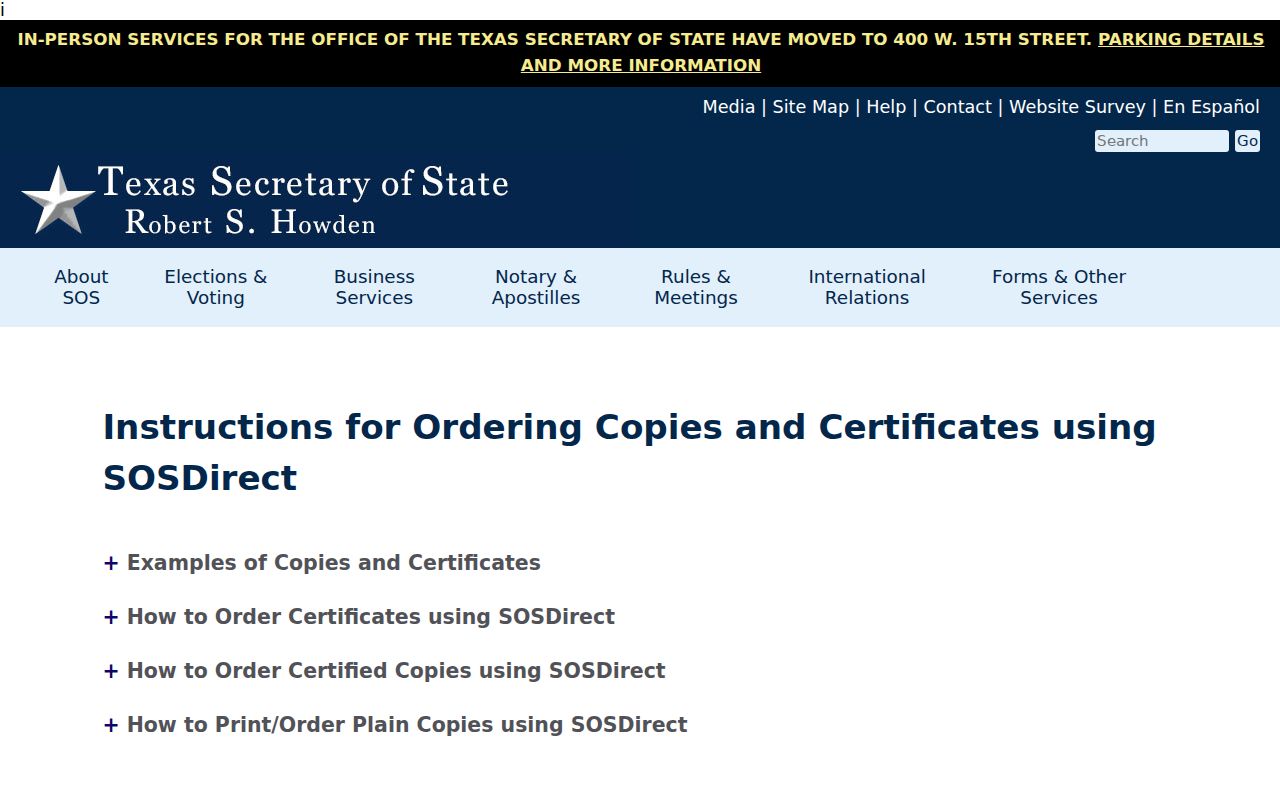
The source view reinforces that filing copies, status certificates, and name searches are separate actions with their own fees and account rules.
Historical Baytown Resident Directories
For a past household, the historical shelf is often more useful than a current index. Sterling Municipal Library maintains local files, street maps, oral histories, newspapers, yearbooks, and genealogy databases. The UNT Portal holds the 1929–30 Tri-City Directory, the 1967 Baldwin ConSurvey and Baytown Sun directory, and Johnson’s runs from 1979, 1980, and 1982. The digitized 1967 volume includes alphabetical, telephone, civic, business, street, and householders sections.
Older searches need more than the word Baytown. Pre-1948 material can be filed under Goose Creek, Pelly, Tri-Cities, Cedar Bayou, Highlands, Wooster, or other historical community names. A directory entry is a dated lead, not evidence of a current relationship. The full collection and entry-reading method belong in the Baytown city directory collections.
Baytown’s Tri-Cities Name Trail
Baytown’s record trail changed with the place itself. Goose Creek and Pelly incorporated in 1919. Humble Oil’s development brought streets, utilities, and employee lots in 1923. Pelly was annexed in 1945, and the consolidation story ended with the 1948 charter. A name search that begins and ends with the modern label can miss a historical directory, newspaper item, map, or property clue filed under an earlier community.
The 1929–30 Tri-City Directory makes that issue visible because it covers Baytown, Cedar Bayou, Crosby, Goose Creek, Highlands, Pelly, Stewart Heights, and Wooster. Search those names as historical location terms, then confirm the parcel and county with modern map tools. They are research clues, not interchangeable legal boundaries.
Note: A historical community name can explain a failed modern search, especially when an old street guide uses a continuation or older alignment.
Baytown Public Record Limits
Public access has limits that matter. Texas guidance protects common sensitive fields, including living-person birth dates, driver-license numbers, license plates, financial identifiers, juvenile information, and protected addresses. The Texas Address Confidentiality Program protects enrolled survivors through a substitute mailing address. Harris voter and tax-office forms also provide limited suppression or opt-out routes. An absent field may be a working privacy rule, not a search failure.
Lawful personal research. Use records for family history, reconnection, estate questions, civic understanding, correction, or safety awareness. Do not use a record to stalk, harass, threaten, impersonate, or expose a protected person.
Commercial people-finder services may combine old directory, court, property, phone, and address fragments, but their matches can be stale or merge different people. Use the source custodian to correct an official record or ask about a documented suppression process. For municipal records not posted online, a written Texas Public Information Act request seeks existing material, subject to statutory exceptions.
Baytown Custody and Registry Boundaries
Custody and registration systems are separate from the residents directory trail. The Texas DPS Sex Offender Registry is an official statutory registry with its own cautions and field limits. Harris County jail, Texas prison, and federal custody searches are distinct systems. A result in one does not establish a status in another, and a name-only match needs more than one independent signal.
Search an official system directly, note its update notice, and keep personal details to the minimum needed for a lawful question. For a suspected scam, use the public number of the relevant office rather than a caller’s instructions.
The official DPS registry search shows the state-run interface rather than a commercial compilation.
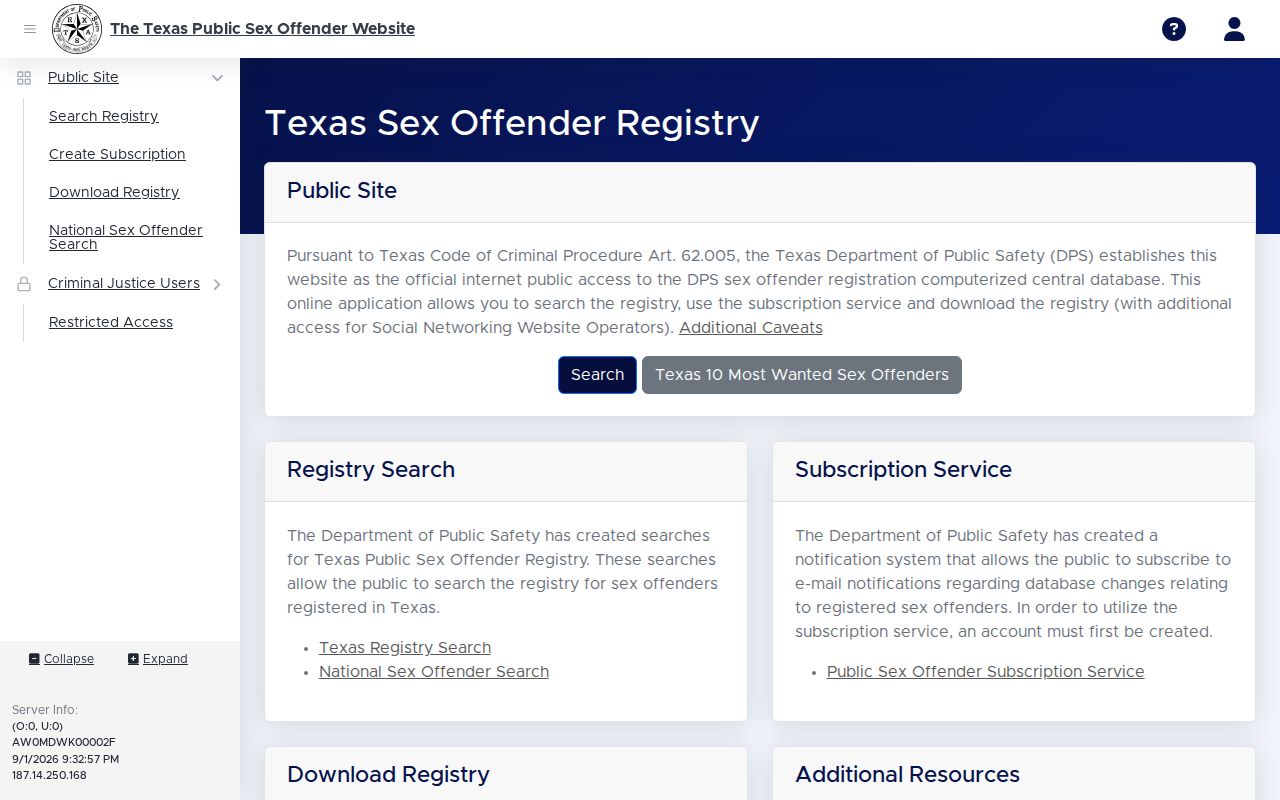
Use its caution and privacy information as part of any interpretation, because the public fields are intentionally limited.
Baytown Claim and License Search Cautions
Texas Comptroller ClaimIt and the Baytown Finance claim form can produce a name lead for unclaimed property, but they are claim procedures, not identity proof. ClaimIt has last or business name, first name, and search controls. The State warns that it does not request banking credentials by phone or text, and it sends claim payments by check. Baytown’s form requires identity and prior-address material through the official channel. Do not send sensitive documents to an unverified caller.
For credentials, the issuing board remains the best route. TDLR, the Texas Board of Nursing, the dental board, and educator certification each maintain different fields and refresh schedules. Match a license number, type, status, and date to the official source rather than relying on a name alone.
The TDLR License Search is the correct starting point when the question is about a Texas credential.
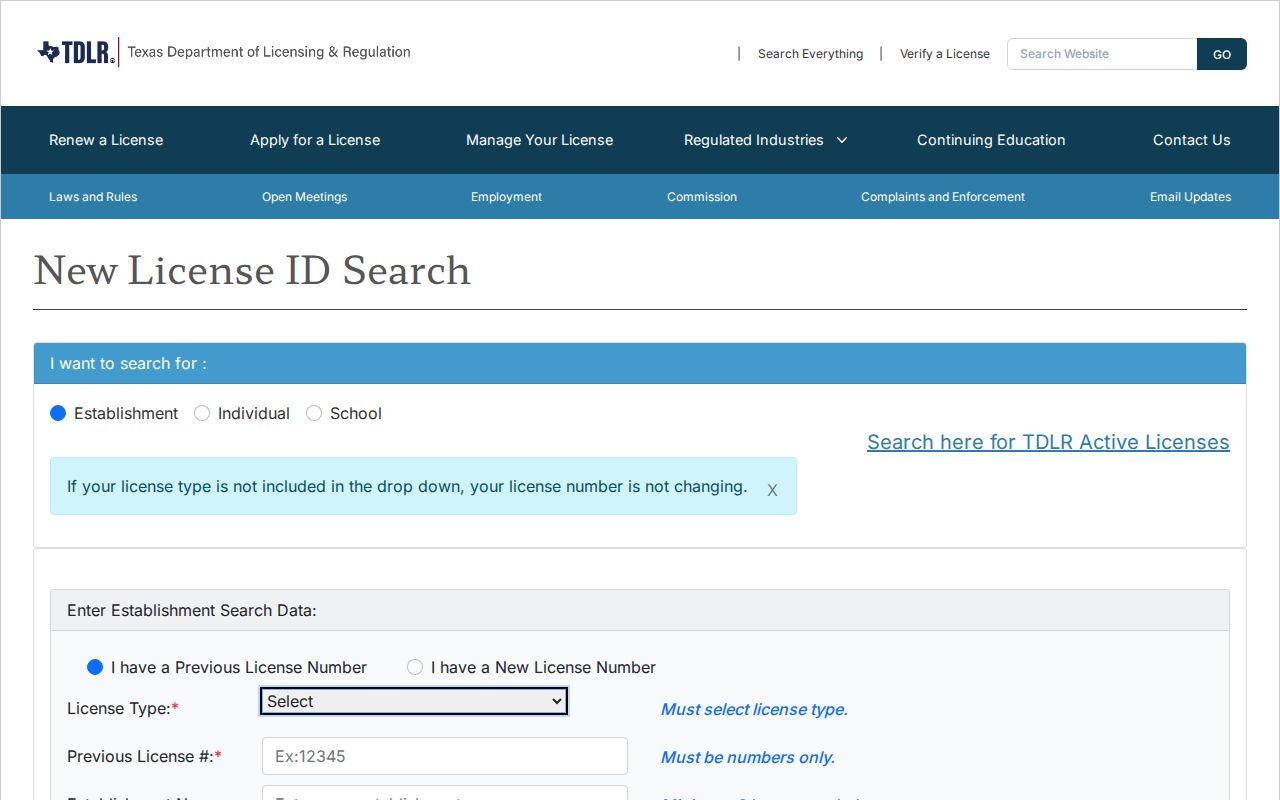
The required license-type control and the available name or number modes show why a credential lookup should stay tied to its issuing agency.